Finding your campaign ID
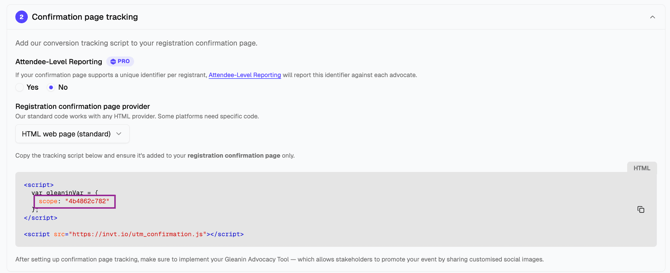
Finding your event ID (scope)
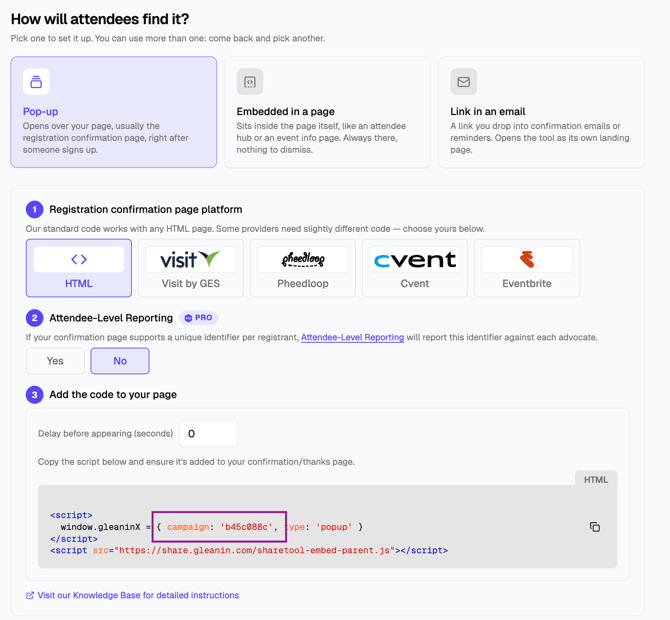
Finding your campaign ID
- Go to the Event
- Click Attendee Campaigns on the left-hand side menu
- Click your campaign, then click Distribution
- Choose Pop-up, and at the bottom of the page, you will find it in the code (the ID in the image is an example only - each of your campaigns will have its unique ID generated):
For example, in …/share/c/a1b2c3d4, the campaign ID is a1b2c3d4.
Note: The Distribution tab offers nothing until your campaign has a Landing page URL. You can add it on the Share text & link tab.
Finding your event ID (scope)
- Go to the Event
- Click Conversion Tracking on the left-hand side menu
- Click Confirmation page tracking to open it
- Under Registration confirmation page provider, choose any provider from Select provider to generate code
- In the code that appears, the event ID is the text between the quotation marks on the line scope (scope ID in the image is an example - your event will have its own unique scope generated):